

About AutomapAI: Semantic Normalization at Scale
AutomapAI™ is a semantic normalization platform and NLP-driven terminology server. It automates the mapping of unstructured EHR data, HL7 FHIR resources, and legacy clinical codes to global standards including SNOMEDCT, LOINC, RXNORM, ICD10CM, and USCDI.
The same platform can serve life-sciences organizations and researchers by supporting CDISC standards, OMOP data models, and more.
Take the data you have and map it to the data you need.

What are the Challenges in Mapping Healthcare Data?
Real-world health data is complex, often existing as a mix of unstructured clinical narratives, scanned documents, local codes, and potentially legacy coded data. Much of this information is inaccurately coded or not coded at all, making interoperability effectively impossible.
AutomapAI converts complex, disparate data into standardized codes, delivering the accuracy and precision required to drive smarter patient screening, reliable querying, focused cohorting, and quality reporting across large or small healthcare data repositories.
What use cases does AutomapAI solve?
-
✺
Terminology Crosswalk
Develop concept maps from local terminology codes to the standards, or from one standard to another. Prepare initial maps in a fully automated way and finalize with light human curation.
-
✺
Semantic Standardization
Start with FHIR resources, CCDA documents, or text strings containing medical content and normalize to USCDI or other terminology standards.
-
✺
NLP + Terminology Linking
Start with clinical notes, extract relevant entities that you are interested in and link content to the terminologies you need. Can be used for concept indexing of journal articles, extraction of codable criteria from clinical trials write-ups, or extraction of clinical information from hospital notes.
How does AutomapAI make mapping of unstructured healthcare data more Productive?
Less manual effort. Automated matches give every mapping project a starting point, so subject matter experts spend their time on the decisions that need their expertise instead of searching from scratch.
Lower integration costs. Local codes, legacy standards, and unstructured text become standards-aligned data, without costly downstream cleanup.
Consistent, scalable mappings. Whether you're cleaning up legacy data, prepping for interoperability, or building clinical decision support, AutomapAI accelerates the process.
Ready for analytics and AI. Normalized data provides the reliability advanced analytics and AI depend on.
Within your security framework. AutomapAI operates entirely within your organization's internal security framework, so mapping is automated while security and auditability stay in your control.
How It Works
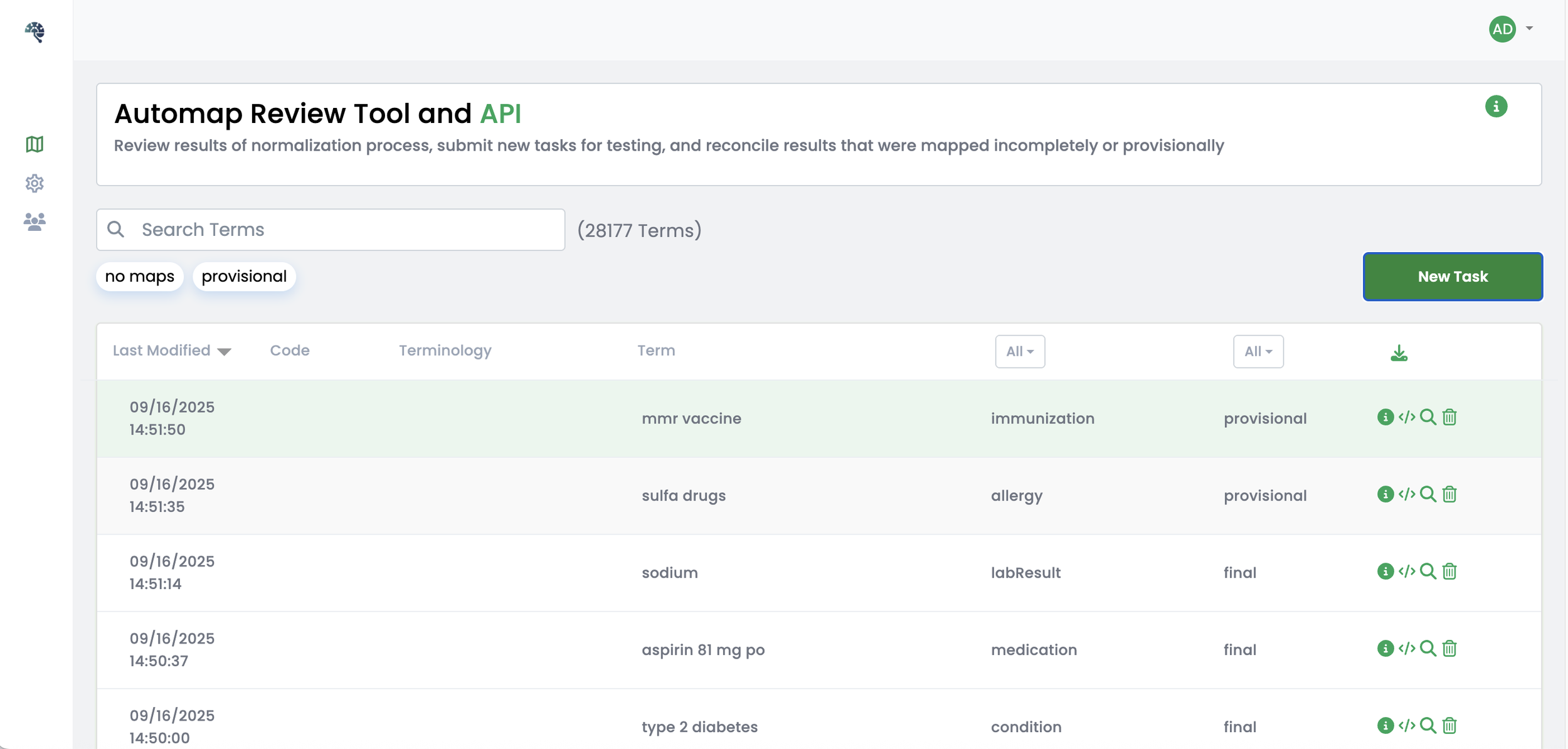
AutomapAI uses a pipeline that takes coded or raw text input and produces matches in the desired output coding system, with a confidence score for each. It combines AI/ML, lexical matching, and semantic rules to identify and rank potential matches. When no match is confident enough, the term is marked as “provisional” so it can be subjected to follow-up review by humans or other processes.
AutomapAI can be used in these ways:
Task API. Send individual terms or batches of terms from your own systems and data pipelines and get matches back synchronously or asynchronously.
FHIR API. Send individual FHIR resources or bundles and the system augments “code” fields with additional codes as computed by the pipeline (and marked in a way to differentiate from original data).
Via User Interface. Use the AutomapAI UI in a browser to load individual terms or batches of terms, evaluate suggestions, and review/manage results.
Demonstrating Value
See a demonstration of our AutomapAI UI as it performs a mapping exercise on a set of content to derive USCDI mappings for conditions, procedures, lab results, and medications across SNOMEDCT, ICD10PCS, LOINC, and RXNORM.
For developers, a quick guide on how to interact with AutomapAI’s APIs.
Choose Your AutomapAI Plan
Basic
$0 (free)
Map to static code systems
No payment required
Online demo environment
Rate-limited
Limited support
Popular
Special Pricing
Qualified Startups are offered a first-year AutomapAI Standard license for $10,000
AutomapAI Development licenses are available for $5,000/year (no production use)
Standard
$5k/mo, $55k/year
Save 1 month w/annual billing
Map to your code systems
Complex maps supported
Runs in your environment
Full support
Enterprise
Contact Us
Everything in Standard
Custom features
Unlimited users and organizations
Priority support
Expert Support
Choose the level of support that fits your team. Options can be combined.
Tooling access. We build a deployment with mapping pipelines to suit your use cases and make it available as a Docker image that runs locally. Use APIs programmatically or use the AutomapAI User Interface to explore and evaluate your data sets.
Consulting services. WCI's team can review, build, and maintain your mappings. When a map needs formal review and approval workflows, we deliver it through our Terminology Mapping Services, built on MT2.
Frequently Asked Questions
How can we try it?
Try the online demo with sample data, no sign up needed. To discuss a deployment, contact info@terminologyhub.com.
Does our data leave our environment?
No. AutomapAI runs as a Docker image inside your own environment, behind your security and access controls. The online demo is only for testing with sample data.
Which standards can AutomapAI map to?
SNOMED CT, LOINC, RxNorm, ICD-10-CM, and USCDI, among others. It also supports CDISC standards and OMOP data models for life sciences and research.
Can AutomapAI work with unstructured text?
Yes. It can pull relevant terms from clinical notes and other free text and link them to the standards you need.
What happens when AutomapAI isn’t confident about a match?
Every match gets a confidence score. When no match is confident enough, the term is marked “provisional” so your team or another process can review it, instead of being filled with a guess.
Do we need to use the user interface?
No. You can send terms or FHIR resources through the Task API or FHIR API and get matches back without any interface. The UI is there for teams that want to review and adjust results in a browser.
How is AutomapAI priced?
Basic is free in TermHub. Standard is $5,000 per month or $55,000 per year. Enterprise pricing is customized to your needs. See the plans above for details.
Are there discounts for startups or development work?
Yes. Qualified startups can get a first-year Standard license for $10,000. Development licenses for non-production use are $5,000 per year.
What’s the difference between Basic and Standard?
Basic lets you try AutomapAI in TermHub with standard code systems. Standard runs in your own environment, maps to any code system, and includes full support.
Do we need WCI’s mapping services or MT2 to use AutomapAI?
No. AutomapAI works on its own through its APIs and UI. WCI’s team can help review, build, and maintain your mappings if you want support, and maps that need formal review and approval can be handled through our Terminology Mapping Services.