
TermHub to PostgreSQL: Query RXNORM in your own Database
By Jesse Efron, Chief Operating Officer at West Coast Informatics. Published on the TermHub blog Updated August 14, 2026.
TermHub™ offers the latest RXNORM release, like every terminology it carries, in a format that loads straight into PostgreSQL, so you can query it with SQL. TermHub is a managed terminology platform from West Coast Informatics that provides access to code systems, maps, and value sets. That format is called Simple Data Format: eight plain text files covering concepts, terms, relationships, and attributes, with the load scripts included.
This post is divided into two parts. In the first part, we introduce you to TermHub’s Simple Download Format, demonstrate how to access the latest RXNORM instance, and how to import those files into your Postgres Database. In the second part, we provide some example RXNORM-specific SQL queries and further suggestions on how to use RXNORM within SQL.
There are only five basic steps needed to start querying:
Create an account or Sign in to TermHub.
Open the RXNORM Latest public project on the TermHub Dashboard.
Create a UTF-8 database and run the table creation script in POSTGRES.md file.
Part 1: Populate PostgreSQL with RXNORM
Why put RXNORM drug data in a SQL database?
A flat, relational copy of RXNORM is worth having when your questions span the whole release rather than one drug at a time.
Analysis, joining drug concepts to your own formulary or claims data, validating code lists in bulk, and building value sets are all natural in SQL, where an API is better suited to lookups and validation at the point of use.
A local copy is also pinned to a specific release, so the same query returns the same answer months later, which matters for audits, submissions, and published work. And it needs no new skills, since anyone who can write a join can use it.
Where do you download simple RXNORM data?
From TermHub, as a public project. Simple Data Format is TermHub's flat, relational representation of a terminology, and RXNORM is one of the public projects.
Start by creating an account or signing in at TermHub. From the Dashboard, turn on the public projects filter and RXNORM Latest appears alongside the other public terminologies. Open it and you land on the project page with a table of the terminologies it contains.
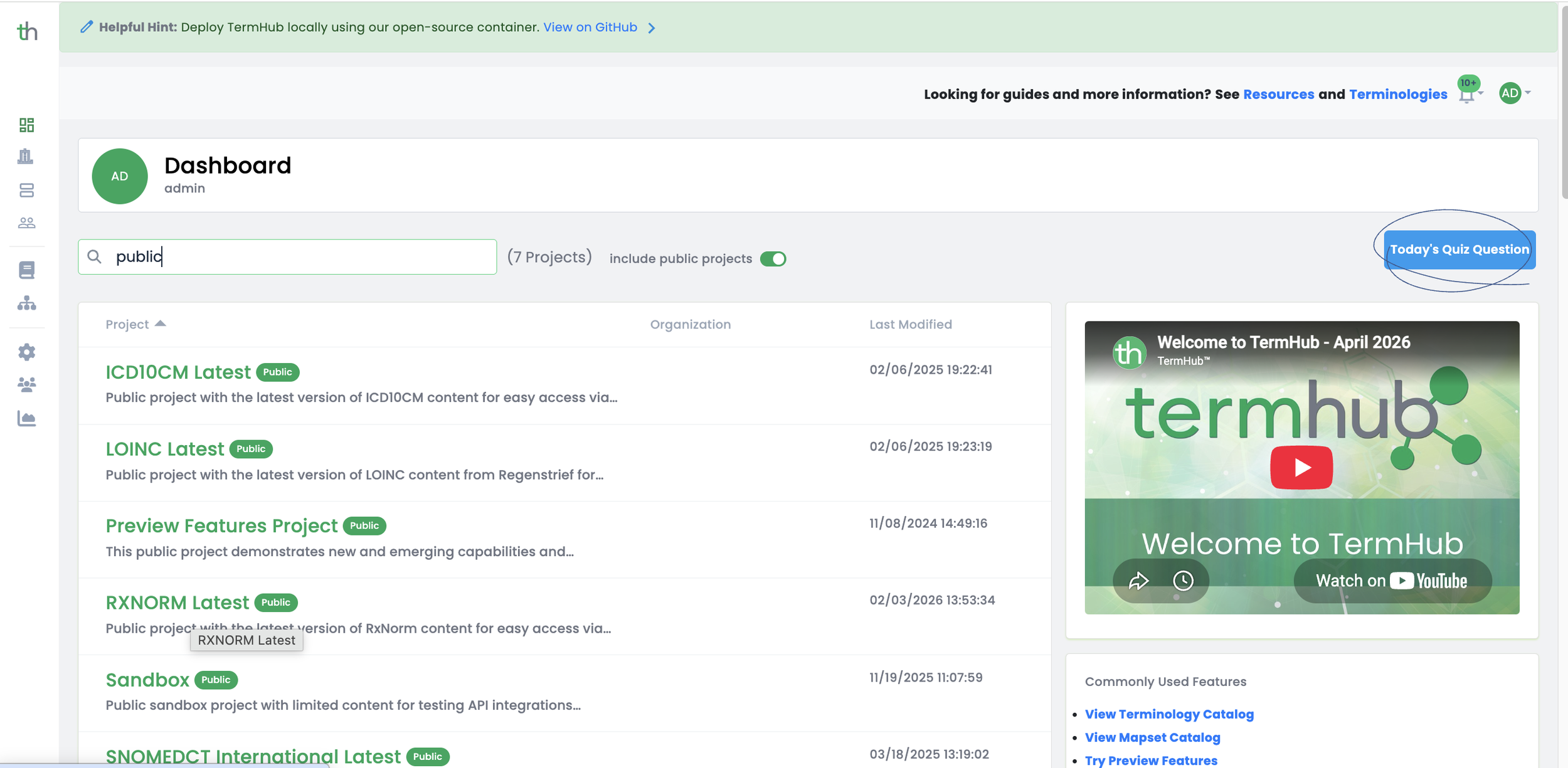
Select the RXNORM Latest Public Project
Find the RXNORM row and click the download icon at the end of it. The Download Terminology Data modal opens with four formats, each with its own download button. Choose Simple, and you get a zip, roughly 170 MB unzipped, containing eight text files, a README, and the POSTGRES.md load scripts.
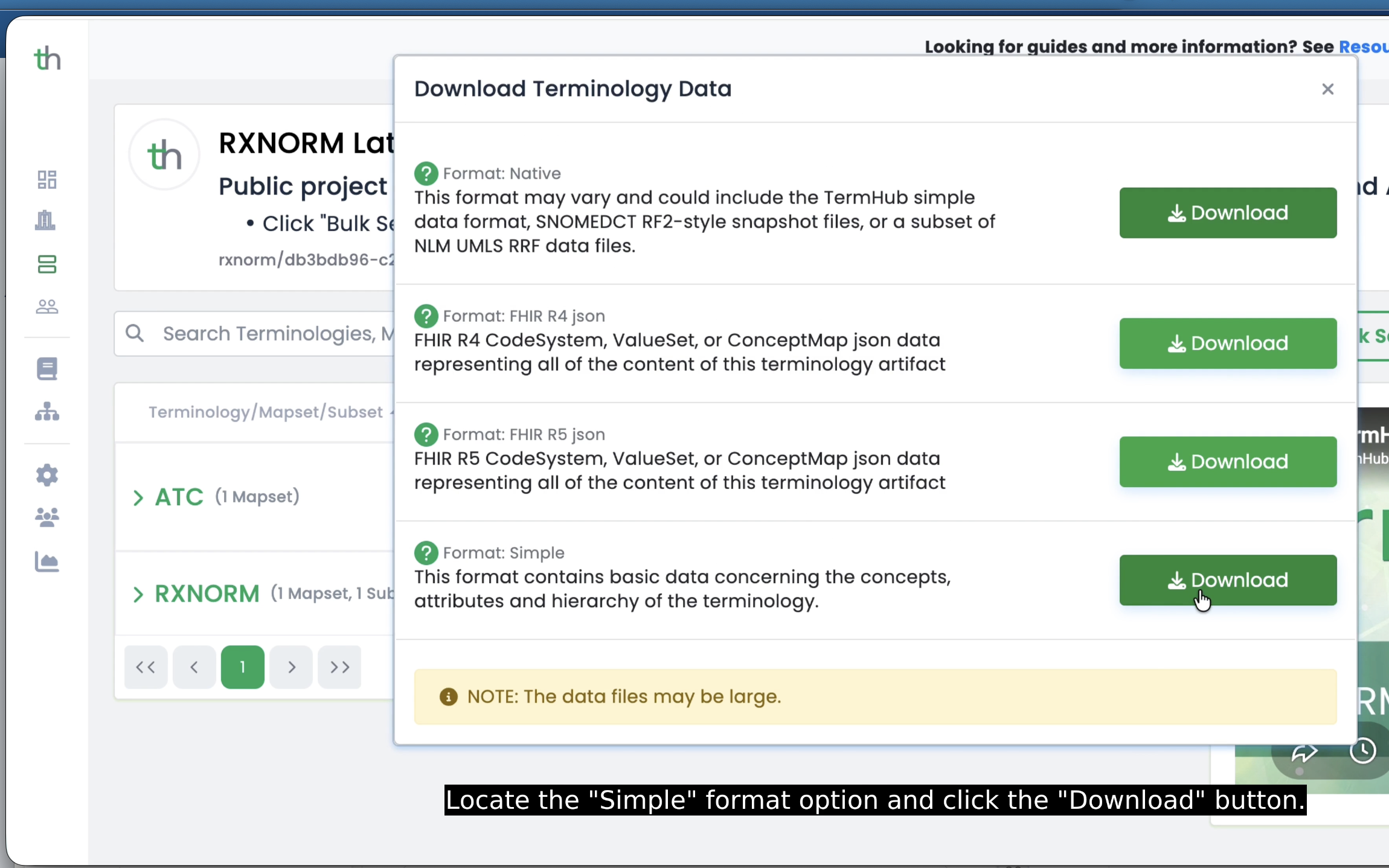
Selecting the Simple Data Format
RXNORM Latest always points at the newest monthly release, so the same project is where you return each month.
Which RXNORM format works best in a database?
Simple Data Format, in nearly every case. The real choice is between it and Native, which for RXNORM means NLM's RRF release. Both are pipe-delimited text that any database can load, so the difference is what shape the content arrives in.
RXNORM draws drug names from many source vocabularies, and NLM reports that roughly 60% of those names receive an RXNORM normalized name. Simple Data Format hands you those normalized forms already resolved. RRF hands you everything, and you filter to the normalized subset yourself.
| Simple Data Format | Native (RRF) | |
|---|---|---|
| Structure | Eight tables, identical for every terminology. | Tables specific to RXNORM and the UMLS. |
| Content | RXNORM normal forms, already resolved. | Full source-level detail, including source abbreviations, term types, and suppression flags. |
| First useful query | Immediately after load. | After you filter to the normalized subset yourself. |
| Adding a second terminology | Same schema, same scripts, same queries. | A new schema and a new ingest for each one. |
What does the RXNORM clinical terminology schema look like?
If you want to load RXNORM into PostgreSQL, it helps to understand how the data is organized first.
The RXNORM download from TermHub is provided as eight pipe-delimited text files. Each file represents a different part of the RXNORM data model, and the accompanying `POSTGRES.md` file provides the PostgreSQL table definitions and commands needed to load them. Those eight files map one to one onto eight tables.
| File | Contains |
|---|---|
| concepts.txt | One row per RXNORM concept, keyed by RxCUI, with an active flag, semantic types, and a preferred name. |
| terms.txt | Every drug name and synonym, with its RXNORM term type. |
| termAttributes.txt | Attributes attached to names, including NDC codes, strengths, and UMLS CUIs. |
| attributes.txt | Attributes attached to concepts. Not populated for RXNORM. |
| relationships.txt | How drugs, ingredients, brands, and dose forms connect. |
| parChd.txt | Parent and child pairs. Not populated for RXNORM. |
| metadata.txt | Descriptions for the term types, relationship names, and attribute names used elsewhere. |
| version.txt | Terminology name, version, and release date. |
Four of these are worth a closer look before you load.
concepts is keyed on code, which for RXNORM is the RxCUI. The semantic_type column holds UMLS semantic types and can carry more than one, separated by semicolons, so an ingredient might be both a Pharmacologic Substance and an Organic Chemical. concept_name is the RXNORM normalized name.
relationships is where the RXNORM model lives. Ingredients, brand names, dose forms, and drug components are all connected here rather than in a hierarchy table. Relationship names are already readable, such as has_ingredient, has_tradename, and consists_of, and they come in matched pairs, so every has_ingredient has a corresponding ingredient_of in the other direction.
par_chd is empty for RXNORM. RXNORM expresses its hierarchy through isa and inverse_isa relationships rather than a separate parent and child table, so hierarchy queries go through the relationships table. This is a good illustration of what does and does not change between terminologies: the schema is identical, but which tables carry content depends on how the source terminology is built.
term_attributes is the most valuable table in the RXNORM export and the easiest to overlook. NDC codes, available strengths, RxTerm dose forms, and UMLS CUIs all live here.
Which healthcare terminologies can you load into a SQL database?
Any terminology you can access in TermHub, whether it comes from a public project or one of your own private projects. All of them download in Simple Data Format with the same eight tables and the same load scripts. What changes for each code system is the content that populates those tables.
Five terminologies are available as public projects, which need nothing beyond a free account to access their Simple Data Format files:
RXNORM
SNOMEDCT International Edition
SNOMEDCT US Edition, including the US Extension
LOINC
ICD10CM
Each is listed on the Dashboard as a Latest project, meaning it tracks the current release.
Private projects work the same way. Whatever you license or load into a project of your own downloads in Simple Data Format and loads with the same scripts. This includes when you bring your own data into TermHub. Private projects are described on the plans page.
How do you load RXNORM into PostgreSQL?
Create a UTF-8 database, run the table creation script from POSTGRES.md, then load the eight files with \copy.
1. Create the database
From Command Line:
createdb -E UTF8 <your_database_name>Or within psql:
CREATE DATABASE rxnorm WITH ENCODING = 'UTF8';UTF-8 matters. Drug names include characters that will fail to load under other encodings.
2. Create the tables
Open POSTGRES.md from the download. The Create Tables section defines all eight tables. Run it as written. The first two look like this:
-- Switch to your database
\c <your_database_name>

-- Ensure UTF-8 encoding for the session
SET client_encoding = 'UTF8';

-- Create the tables
CREATE TABLE concepts (
    code          TEXT PRIMARY KEY,
    active        BOOLEAN NOT NULL,
    semantic_type TEXT,
    concept_name  TEXT NOT NULL
);

CREATE TABLE terms (
    code      TEXT NOT NULL REFERENCES concepts(code),
    term_id   TEXT PRIMARY KEY,
    active    BOOLEAN NOT NULL,
    language  TEXT NOT NULL,
    term_type TEXT NOT NULL,
    term      TEXT NOT NULL
);
The remaining six tables follow the same pattern, each referencing concepts(code).
3. Load the files
Run this from the directory holding the unzipped files:
-- Switch to your database
\c

-- Set encoding for the load session
SET client_encoding = 'UTF8';

\copy version FROM 'version.txt' WITH (FORMAT CSV, DELIMITER '|', HEADER, QUOTE E'\x01')

\copy concepts FROM 'concepts.txt' WITH (FORMAT CSV, DELIMITER '|', HEADER, QUOTE E'\x01')

\copy attributes FROM 'attributes.txt' WITH (FORMAT CSV, DELIMITER '|', HEADER, QUOTE E'\x01')

\copy par_chd FROM 'parChd.txt' WITH (FORMAT CSV, DELIMITER '|', HEADER, QUOTE E'\x01')

\copy relationships FROM 'relationships.txt' WITH (FORMAT CSV, DELIMITER '|', HEADER, QUOTE E'\x01')

\copy terms FROM 'terms.txt' WITH (FORMAT CSV, DELIMITER '|', HEADER, QUOTE E'\x01')

\copy term_attributes FROM 'termAttributes.txt' WITH (FORMAT CSV, DELIMITER '|', HEADER, QUOTE E'\x01')

\copy metadata FROM 'metadata.txt' WITH (FORMAT CSV, DELIMITER '|', HEADER, QUOTE E'\x01')
Two things about this script.
Keep the order. Every other table has a foreign key to concepts, so concepts must load first, and term_attributes references terms, so terms must load before it.
Use \copy rather than COPY. \copy is a psql command that reads the file from your machine. COPY is a server command and expects the file to sit on the database server.
Run the two empty files anyway. attributes.txt and parChd.txt contain only a header row for RXNORM, and loading them keeps the script identical across terminologies.
A quick look at accessing the latest version of RXNORM to download and query in your local database.
How do you keep an RXNORM database up to date?
Download the new release in Simple Data Format and re-run the same load scripts. The schema does not change between releases, so nothing about your load changes either.
NLM publishes the full RXNORM data set on the first Monday of each month, moving to Tuesday when that Monday is a federal holiday. TermHub carries that monthly release, making it available shortly after NLM publishes it, generally within about a day. The project keeps the same name, so RXNORM Latest always points at the current version.
The monthly release is a complete replacement rather than an increment, so every download from TermHub is a self-contained data set. There is nothing to merge and no risk of applying files out of order. NLM also publishes weekly files of newly approved products, designed to be layered on top of the most recent monthly release. If your work depends on drugs approved in the last few weeks, take those weekly files directly from NLM.
To refresh an existing database, delete the database and rerun the steps above.
drop database <your_database_name>Monthly releases matter more for RXNORM than for most terminologies, because new drug products appear continuously. A database loaded six months ago will be missing recently approved products entirely. The version table is what tells you which release you are on.
Part 2: Query RXNORM in PostgreSQL
Why query RXNORM in SQL instead of a terminology browser?
RxNav answers questions about RXNORM one drug at a time. SQL answers questions about your own data against the entire release at once.
That difference shows up in four places:
Set operations. Counting, grouping, and comparing across hundreds of thousands of drug concepts is a single query rather than a lot of clicking.
Joins to your own tables. Your formulary, your medication orders, and your NDC inventory can sit alongside RXNORM in the same database.
Repeatability. A query is a file you can version, review, and re-run against the next monthly release.
No pagination or rate limits. The data is local.
RxNav is still the better tool for exploring an unfamiliar drug. SQL is the better tool once you know what you are looking for and need it applied at scale.
How do you filter inactive RXNORM concepts in SQL?
Filter on concepts.active = true. RXNORM retains obsolete concepts so that historical prescription records stay resolvable, and a substantial share of the concepts in any release are inactive.
SELECT code, concept_name
FROM concepts
WHERE active = true;
Two things worth knowing about how the flag behaves.
Filtering terms is not the same as filtering concepts. Obsolete concepts keep their names, so they still carry active terms. Filter on concepts.active when you want current content.
Terms carry their own flag. An active concept can have obsolete names. When you are building a search index or a medication picklist, filter both:
SELECT c.code, t.term
FROM concepts c
JOIN terms t ON t.code = c.code
WHERE c.active = true
  AND t.active = true;
The term_attributes table also carries a suppressible attribute and an RXN_OBSOLETED date, which are finer-grained signals than the active flag. Most work does not need them, but they are there when it does.
What can you query in RXNORM with SQL?
Anything the eight tables hold: drug names and synonyms, the ingredients behind a clinical drug, the brands that contain a generic, NDC codes, dose forms, and strengths. The three worked examples below cover name search, ingredients, and brand names, and each one runs against the tables exactly as POSTGRES.md creates them.
The examples below use RxCUI 83367 (atorvastatin) and RxCUI 617312 (atorvastatin 10 MG Oral Tablet) as the worked examples. Both appear in our introduction to RXNORM.
How do you search RXNORM by drug name?
Searching terms rather than concepts matters, because it finds brand names and synonyms. A search for Lipitor reaches the same drug products as a search for atorvastatin.
SELECT DISTINCT c.code, c.concept_name, m.description AS term_type
FROM concepts c
JOIN terms t    ON t.code = c.code
JOIN metadata m ON m.abbreviation = t.term_type
WHERE c.active = true
  AND t.active = true
  AND lower(t.term) LIKE '%atorvastatin%';
How do you find the ingredients of a drug in RXNORM?
A clinical drug does not point at its ingredient directly. It points at drug components, and those point at ingredients.
SELECT DISTINCT i.code, i.concept_name
FROM relationships r1
JOIN relationships r2 ON r2.from_code = r1.to_code
                     AND r2.additional_type = 'has_ingredient'
JOIN concepts i       ON i.code = r2.to_code
WHERE r1.from_code = '617312'
  AND r1.additional_type = 'consists_of';
How do you find the brand names for a generic drug in RXNORM?
For atorvastatin, the query below returns Lipitor along with the other brands that contain it, including combination products.
SELECT b.code, b.concept_name
FROM relationships r
JOIN concepts b ON b.code = r.to_code
WHERE r.from_code = '83367'
  AND r.additional_type = 'has_tradename'
  AND b.active = true;
What are other RXNORM SQL query use cases?
The most common ones are NDC mapping, dose form and strength lookup, release profiling, display labeling, and code list audits. There are as many use cases as questions you can ask of drug data. A few that come up often:
Map NDC codes to RxCUIs. NDC codes live in term_attributes, so a package code resolves to a drug concept in a single join.
Pull dose form and strength. Dose form is a relationship; strength is a term attribute.
Count concepts by term type. A quick way to see the shape of a release and what SCD, SBD, IN, and BN actually cover.
Label your own coded data. Join your RxCUIs to concept_name for consistent display names without touching the terms table.
Audit a code list against the release. Find RxCUIs retired since your formulary was written, and codes that were never valid at all.
What is RXNORM RRF format?
RRF, or Rich Release Format, is how the National Library of Medicine publishes RXNORM. It is a set of pipe-delimited text files shared across the UMLS family, with drug names in RXNCONSO, attributes such as NDC codes in RXNSAT, and relationships in RXNREL. Working with RRF means understanding source abbreviations, term types, suppression flags, and the distinction between source-asserted names and RXNORM normalized forms.
Simple Data Format is a flattened view of that content, with the same eight tables TermHub uses for every terminology and PostgreSQL load scripts written for you.
If RXNORM is the only terminology you work with, loading RRF directly is a reasonable path. The files are already pipe-delimited, and NLM ships load scripts for Oracle and MySQL alongside them. Simple Data Format earns its keep the moment a second terminology arrives, because SNOMEDCT, LOINC, and ICD10CM land in the same eight tables and load with the same script.
Frequently asked questions
What is an RxCUI?
An RxCUI is the unique identifier RXNORM assigns to a drug concept. It is the code column in the concepts table and the value every query in this post joins on. Names, attributes, and relationships all point back to an RxCUI.
What license do you need to use RXNORM?
RXNORM is available under the UMLS Metathesaurus License from the National Library of Medicine, which is free to obtain and required before you download. RXNORM draws on source vocabularies with their own terms, some of which restrict redistribution, so review the RXNORM terms of service if you plan to redistribute content.
Which databases can load Simple Data Format?
Any database that can bulk load a delimited file, including MySQL, SQL Server, Snowflake, and DuckDB. The files are plain pipe-delimited text with a header row. POSTGRES.md is written for PostgreSQL, so for another platform you adapt the DDL and swap \copy for that platform's bulk load command.
How often is RXNORM updated?
NLM publishes a full monthly release on the first Monday of each month, moving to Tuesday when that Monday is a federal holiday. TermHub carries that monthly release, which is a complete replacement of the one before it, so each download stands on its own. NLM also publishes incremental weekly files of newly approved products, available directly from NLM.
Why are parChd.txt and attributes.txt empty for RXNORM?
The information is captured elsewhere. RXNORM expresses its hierarchy through isa and inverse_isa relationships rather than a separate parent and child table, and it attaches its attributes to names rather than to concepts. The files ship empty so the schema and the load script stay identical across every terminology.
How large is the RXNORM download?
The RXNORM Simple Data Format download is roughly 170 MB unzipped. The largest file is term attributes.
Get started
RXNORM, SNOMEDCT, LOINC, and ICD10CM are all available as public projects on TermHub with a free account.
A local copy answers questions about a fixed release. For hierarchy queries, value set expansion, and code validation at the point of use, terminology servers do work a database copy cannot. Most teams doing serious work end up with both.
If your organization is exploring querying RXNORM or other terminologies, let us know!